
Welcome to Our Patient Portal


We're Now on MyAtriumHealth  

Staying connected is an important part of your health care journey. Now that Carolina NeuroSurgery & Spine Associates (CNSA) and Atrium Health are one team, we’re making it easier for you to access all your health information in one place by moving your patient portal to MyAtriumHealth.

For our Greensboro & Greater Triad Area patients, the move to MyAtriumHealth will be complete on May 1, 2026. Starting May 1st, your current patient portal will be limited to viewing past health records. Other tools – like messaging your care team or viewing appointments – will be available through MyAtriumHealth. For patients at our Charlotte‑area clinics, this transition was completed on October 1, 2025.

For more information about what this means for you, please review the frequently asked questions below.
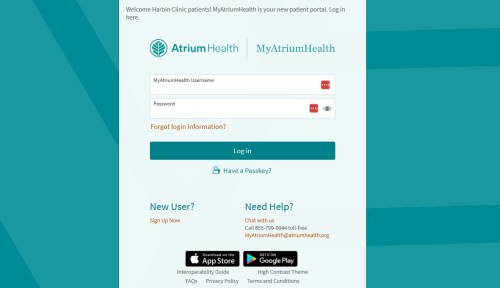

entering myatriumhealth patient portal

All Patients
Sign In Below

MyAtriumHealth

Signing up for MyAtriumHealth

If you already have a MyAtriumHealth account, you can use your existing login information.

If you’re new to MyAtriumHealth, it’s easy to sign up for an account online:

  • You can sign in from here or download the free MyAtriumHealth app in the App Store or Google Play
  • Under New User, select Sign Up Now
  • Answer a few questions and enter your personal information
  • Once you sign up, your account is automatically activated

Get Started


Managing Appointments

If you don’t need to make changes to your existing appointments, just show up as scheduled – no action needed.

You’ll begin receiving appointment reminders via text message. You’ll also be able to manage existing appointments through MyAtriumHealth.

Prefer to speak with someone? You can always manage appointments by calling your provider’s office directly.

Accessing Health Records

Your health records will begin moving from your current CNSA patient portal to MyAtriumHealth.

During this time, some information may be temporarily unavailable – but rest assured, all your records are safe.

Once the transition is complete, you’ll be able to view your records from the last three years in MyAtriumHealth. Older records will still be accessible through records request.


Frequently Asked Questions

Q: When are changes happening for Greensboro patients?

For patients of our CNSA clinic in Greensboro, the move to MyAtriumHealth will be complete on May 1, 2026.

Here’s what you need to know:

  • Health records: Between April 14-17, 2026, some records may be temporarily unavailable while we move your information.* Don’t worry – all your records are safe. Once the transition is complete, you’ll be able to view your records from the last three years in MyAtriumHealth. Older records will still be accessible through records request.
  • Appointments: Unless you make changes, your appointments will continue as scheduled. Starting April 24, you’ll get text reminders and can manage appointments through MyAtriumHealth. Prefer to speak with someone? You can always manage appointments by calling your provider’s office directly.
  • Current portal closing: Starting May 1, your current patient portal will only show past health records. Other features will no longer be available.
Q: When are changes happening for Charlotte-area patients?

The patient portal for CNSA’s Charlotte-area clinics transitioned to MyAtriumHealth on October 1, 2025. The old patient portal is now limited to viewing past health records.

Q: How do I sign up for a MyAtriumHealth account?

If you need an account, it’s easy to create your MyAtriumHealth account online:

  • Visit my.atriumhealth.org
  • Under New User, select Sign Up Now
  • Answer a few questions and enter your personal information
  • Once you sign up, your account is automatically activated
  • Effective date of insurance coverage
Q:  How do I sign up for a MyAtriumHealth account?
If you need an account, it’s easy to create your MyAtriumHealth account online:
  • Visit my.atriumhealth.org
  • Under New User, select Sign Up Now
  • Answer a few questions and enter your personal information
  • Once you sign up, your account is automatically activated
  • Effective date of insurance coverage
Q: Will I lose any of my health information during the transition?

No, you will be able to see three years of your clinical data in MyAtriumHealth, and older records will be available by request. All of your health information will remain fully accessible to your doctors.

Q: How do I get a physical copy of my medical records?

Charlotte-area patients:

You can request a copy of your records using one of the following options:

  • Mail your request to:

Corporate Health Information Management

PO Box 32861
Charlotte, NC 28232

Greensboro patients:

To request a copy of your medical records before May 1, 2026:

To request a copy of your medical records after May 1, 2026:

  • Follow the instructions on this page or call 704-667-9500.
Q: How do I recover my username for MyAtriumHealth?
  • Select “Forgot Username?” on the login screen.
  • Submit your first name, last name, date of birth, and email address.
  • Your username will be sent to the email address associated with your account.
Q: How can I have proxy access to my child’s account or an adult’s MyAtriumHealth account?

Due to certain medical needs, there are instances when a parent or guardian may request full access to the child’s health record that will remain active after the child turns 18 or when an adult needs or would like to grant access of their patient portal account.

Patients age 18 and older may grant access to anyone whom they would like to share their health record. Click on “Your Menu” and choose “Request Family Access.” To grant MyAtriumHealth access to your caregiver or spouse, you can sendan invitation for them to request access.

Q: Is my information secure on MyAtriumHealth?

Yes, we take great care to make sure your health information is private and secure. MyAtriumHealth follows HIPAA laws and uses encryption technology on your records.

Here are more tips to make sure your information is safe:

  • Choose a password that is easy for you to remember, but hard for others to guess.
  • Two-step (or multi-factor) authentication is automatically turned on for everyone to help keep your account secure.
Q: What is two-step authentication for MyAtriumHealth?

Two-step verification is an additional layer of security designed to protect the information in your patient portal account. In addition to signing in to your patient portal account with your username and password, two-step verification prompts you to enter a one-time use security code that helps us verify your identity.

Once you successfully enter your code, we can verify your identity and sign you in. If you choose to skip this step next time, frequent users will only need to do two-step verification periodically.

Two-step verification is turned on by default for all patient portal users to ensure your health information is private and secure.

Q: What if I can’t find an answer to my MyAtriumHealth question?

Our support team is here to help you sign up for an account or answer any questions about MyAtriumHealth. Call 855-799-0044 or email MyAtriumHealth@AtriumHealth.org. Click here to chat with us.